Build a first MCP server by exposing one small read-only function, running it over a local transport, and calling it from a test client. Verify discovery, successful results, invalid inputs and process cleanup before connecting it to an AI host.
MCP, the Model Context Protocol, lets AI applications communicate with programs that provide tools and context. A server does not need a model inside it. Here, the tool reads definitions from a fixed two-term glossary. It needs no API key, network service or access to your files.
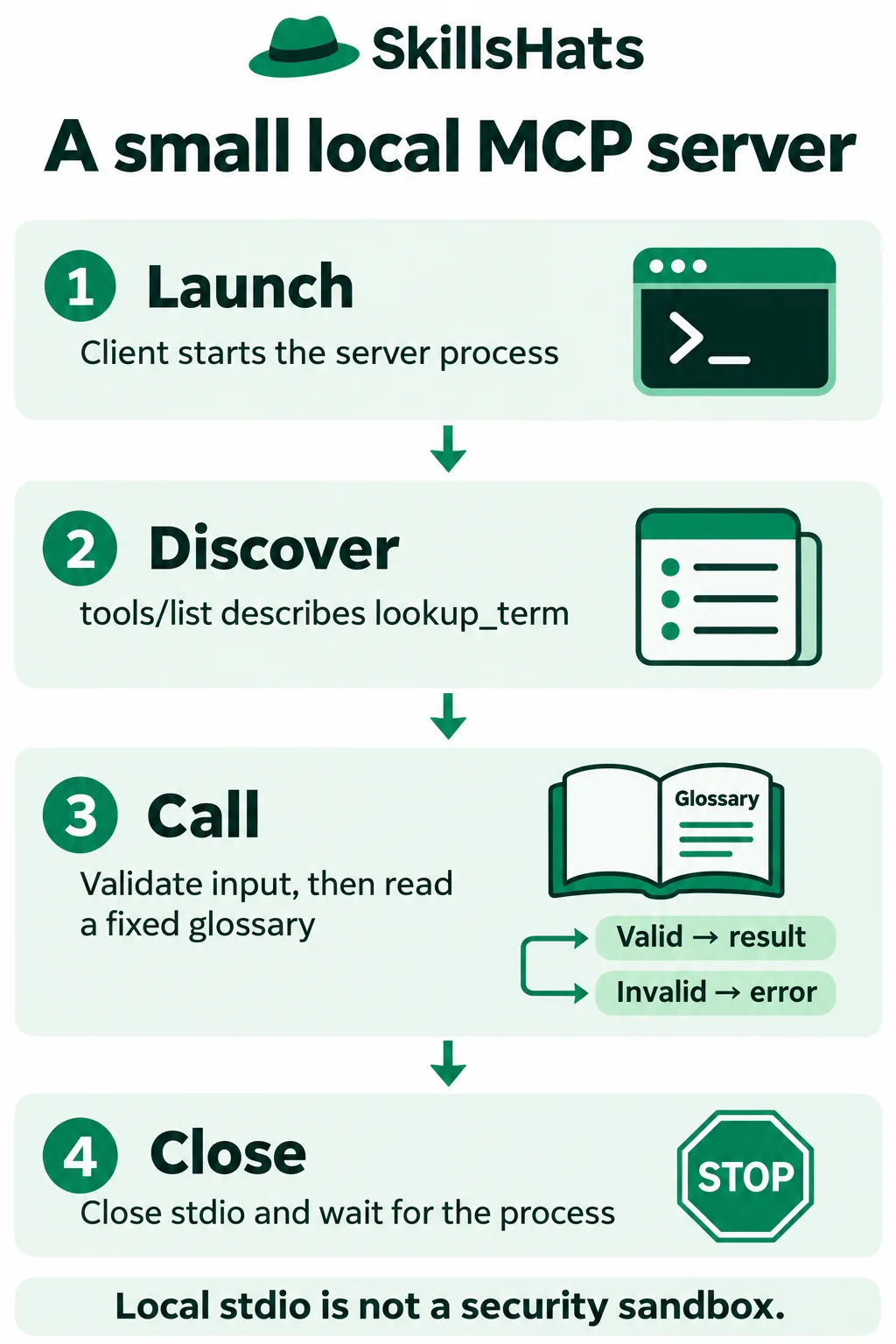
This walkthrough uses the official Python SDK v2, with exact versions below. Older examples using FastMCP and ClientSession belong to a different SDK API; do not mix their imports into this example.
Keep the first tool deliberately small
Imagine an illustrative internal assistant answering questions about technical terms. Before giving it a real knowledge service, you want to verify that a client can discover and call a predictable lookup.
The fixture accepts exactly mcp or stdio and returns one short definition. It does not accept filenames, URLs, SQL or executable commands. That makes its useful behavior and boundary easy to check.
There are three separate parts:
- Server: exposes
lookup_termand runs the lookup code. - Client: launches the process and sends protocol requests.
- Host: the eventual AI application containing a client, permissions and user interface. The test script below exercises the client role without a model.
The official SDK guide identifies v2 as its current stable release line. This tutorial pins mcp 2.3.0, mcp-types 2.3.0 and Pydantic 2.14.3, tested with Python 3.12.14. These are reproducibility choices, not instructions to upgrade another application’s runtime.
Install into an isolated tutorial directory
Create an empty working directory, open a terminal there, and create a virtual environment:
python3.12 -m venv .venv
. .venv/bin/activate
python -m pip install "mcp==2.3.0" "mcp-types==2.3.0" "pydantic==2.14.3"
python -m pip check
The environment activation command above is for a POSIX shell. Use the equivalent activation command for your platform. Keep the two Python files below together in this directory.
The mcp package is the official SDK; mcp-types supplies its protocol types. This example uses the Python client directly, so it does not need the SDK’s CLI extra, Node.js or an Inspector installation.
Define the server and its accepted input
Save this as glossary_server.py:
import sys
from typing import Literal

from mcp.server import MCPServer

mcp = MCPServer("Local glossary")
DEFINITIONS = {
    "mcp": "A protocol for connecting AI applications to context and tools.",
    "stdio": "Standard input and standard output between local processes.",
}


@mcp.tool()
def lookup_term(term: Literal["mcp", "stdio"]) -> str:
    """Read one definition from the fixed two-term glossary."""
    return DEFINITIONS[term]


if __name__ == "__main__":
    try:
        mcp.run(transport="stdio")
    finally:
        print("Glossary server stopped.", file=sys.stderr)
MCPServer holds the server configuration. The decorator registers a tool, using the function name, docstring and type annotation to describe it. The SDK tool documentation explains how those annotations become an input schema: a machine-readable description of allowed arguments.
Literal["mcp", "stdio"] restricts term to those exact strings. The SDK validates a tool call before executing the function. An unknown string or an integer must produce an error result instead of indexing the fixture with an invalid key.
That validation applies to calls through this SDK tool interface. Calling the Python function directly does not turn type annotations into a general runtime permission check. Nor does a valid term authorize access to a private knowledge base; this fixture is public synthetic data.
The server runs over stdio, or standard input and output. The client starts it as a subprocess and exchanges protocol messages through those streams. The official stdio transport specification documents the framing and process lifecycle. Ordinary diagnostic text belongs on stderr, because printing it to protocol stdout can corrupt the exchange.
The finally block writes a shutdown marker to stderr. It is a diagnostic message, not a protocol result.
Discover and call it from a client
Save this as check_glossary.py:
import asyncio
import sys
from pathlib import Path

from mcp import Client, StdioServerParameters


async def main():
    server = StdioServerParameters(
        command=sys.executable,
        args=[str(Path(__file__).with_name("glossary_server.py"))],
    )
    async with Client(server, read_timeout_seconds=5) as client:
        listing = await client.list_tools()
        print("Tools:", ", ".join(tool.name for tool in listing.tools))
        for term in ("mcp", "stdio"):
            result = await client.call_tool("lookup_term", {"term": term})
            assert not result.is_error
            print(term + ":", result.content[0].text)
        unknown = await client.call_tool("lookup_term", {"term": "python"})
        print("Unknown term rejected:", unknown.is_error)
        wrong = await client.call_tool("lookup_term", {"term": 42})
        print("Wrong type rejected:", wrong.is_error)
    print("Client context closed.")


if __name__ == "__main__":
    asyncio.run(main())
Using sys.executable launches the server with the same virtual-environment interpreter as the client. The path beside __file__ selects the intended server file without relying on a second terminal’s working directory.
Entering async with Client(...) starts the child. list_tools() asks what it exposes; call_tool() requests one operation. The SDK handles protocol metadata and message encoding. The script chooses each call itself, so no model or conversational behavior is being tested.
The five-second client read timeout helps detect an unresponsive request. It is not a complete wall-clock budget for process startup, every request and cleanup, and it does not prove that a remote side effect would be undone after a timeout.
Run:
python check_glossary.py
Expected stdout, with exit status 0:
Tools: lookup_term
mcp: A protocol for connecting AI applications to context and tools.
stdio: Standard input and standard output between local processes.
Unknown term rejected: True
Wrong type rejected: True
Client context closed.
You should also see Glossary server stopped. on stderr. The two deliberately invalid calls can produce diagnostic log lines. Their presence is expected here; the client’s explicit rejection flags distinguish them from successful definitions.
In SDK v2, is_error is the Python result attribute used above. Check it before treating returned content as an answer. Connection or protocol failures can instead raise exceptions. The SDK error guide explains that distinction; not every failure arrives as a tool result.
Verify shutdown as well as the answer
The client transport guide documents ownership of a stdio subprocess. Leaving the client context closes stdin and waits for the child; it can kill a process that lingers. Keep all requests inside the context instead of starting a server and abandoning it.
Our server returns normally on end of input. Its shutdown marker confirms that its finally block ran, and Client context closed. is printed after the client context has finished. These messages are useful observations; repeated-run tests should also check for leftover processes.
An exception inside the client block still leaves the context. A forced kill of the entire parent, machine failure or interruption during cleanup is a different case; a Python context manager cannot promise recovery from every operating-system failure.
Do not start glossary_server.py in another terminal for this client. The client already owns its subprocess. Running the server directly may appear to wait because it is expecting protocol input; typing a natural-language question into that terminal is not an MCP request.
Check useful failures before adding a host
| Check | Expected behavior |
|---|---|
| Discover tools. | Exactly lookup_term appears, with two allowed term values. |
| Look up mcp and stdio. | Each returns the matching fixed definition. |
| Send python, an empty string or a missing term. | Error result; no definition is returned. |
| Send an integer or null. | Error result; no coercion into an allowed term. |
| Leave the client normally. | Child exits and the client context closes. |
| Raise an exception inside the client context. | Context cleanup still runs; test for a leftover child. |
If imports fail, confirm that the environment is active and that you installed the pinned v2 packages. If the server cannot be found, check that both files were saved together. If the exchange fails after adding a debug print, check whether that text was written to stdout instead of stderr.
When attaching a real host later, use that host’s supported stdio configuration with the absolute interpreter and server paths. Check its SDK/protocol compatibility and tool-approval interface. This test script demonstrates the protocol client; it does not prove compatibility with every IDE, desktop app or agent runtime.
Know what the local demo leaves out
A fixed lookup is useful for learning the server contract before adding storage or external credentials. A local glossary tool can also serve a small trusted reference set. The advantage is a narrow, predictable operation with few moving parts.
Its limitations matter. Only two exact terms are accepted, the fixture never refreshes, and it has no authentication, persistence, production limits or deployment setup. Every local server process also needs an owner and lifecycle. For an ordinary Python application calling one function, a direct import may be simpler than a protocol boundary.
Stdio does not sandbox the child: it runs as an operating-system process under the chosen account. Review any server before launching it, keep its permissions narrow, and supply only credentials it actually needs. The client and backend must enforce access when you replace public fixtures with private data.
MCP provides the connection, not the decision about whether a model should choose the next step. For that separate design choice, see AI Agents vs Chatbots vs Workflows.
Start with the two allowed lookups and rejection cases, then repeat the test and verify cleanup. Add one new fixture case before adding a database or connecting a model. That gives you a small working contract to preserve as the integration grows.
Topics: Model Context Protocol, MCP server, Python SDK v2, stdio, tool validation, subprocess lifecycle, read-only tools.