An API is an interface that software calls to use another component’s data or behavior. MCP, the Model Context Protocol, gives AI applications a shared interface for discovering and calling tools and obtaining context. An MCP server can wrap an existing HTTP API; the API still does the underlying work.
Use a direct API call when your application already knows the operation it needs. Consider an MCP adapter when several compatible AI applications should discover and use the same capability. The adapter adds integration code and another boundary to secure and maintain.
This example looks up the same synthetic weather data through both paths. It uses an actual local HTTP service and an SDK-backed MCP client/server, without a model, cloud account, API key or real weather feed.
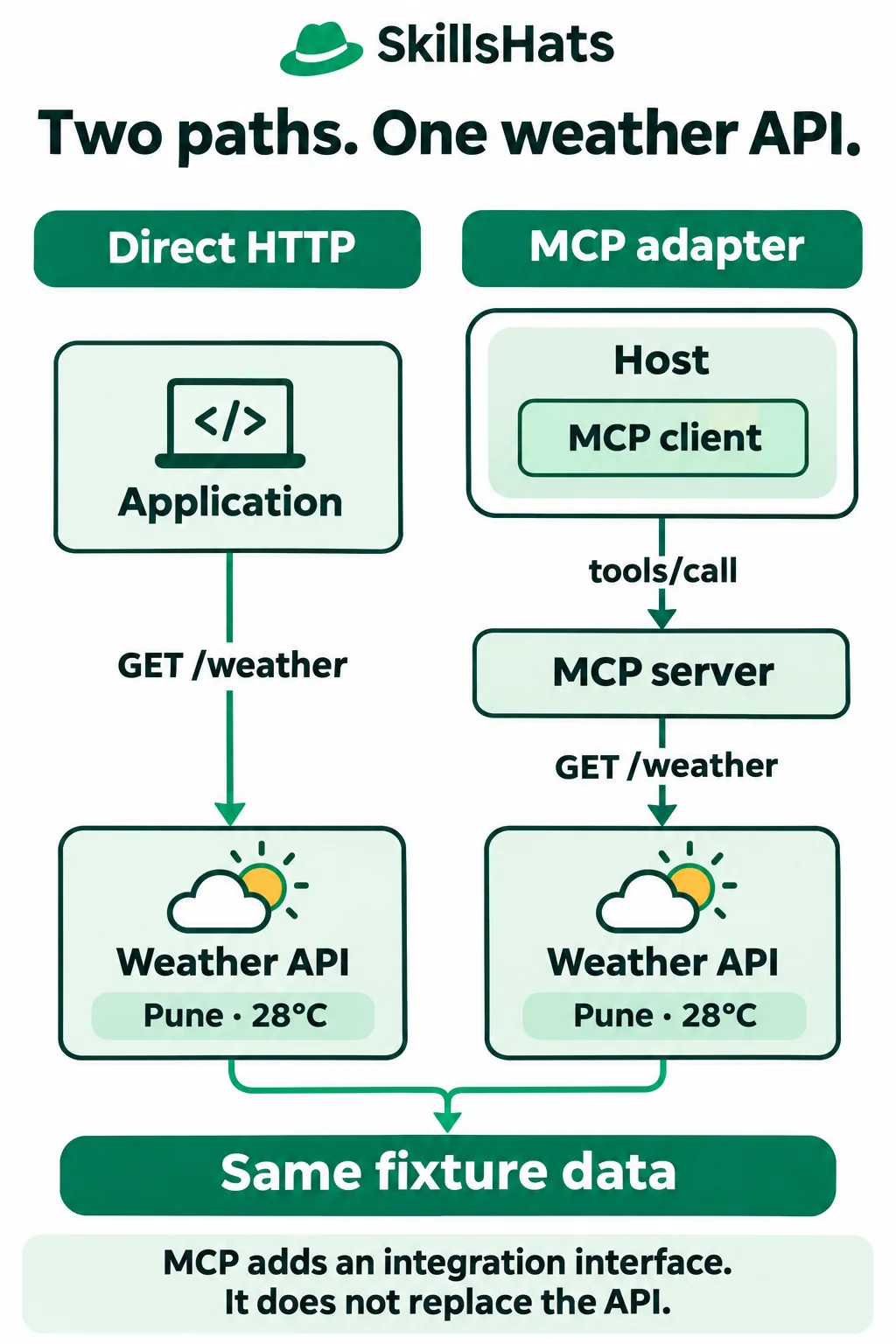
The illustration shows why these are layers that can work together. Changing the way an application reaches the weather service does not change who supplies the weather data.
Compare the interfaces, not just the acronyms
Here, “direct API” means a conventional HTTP endpoint, such as GET /weather?city=Pune. APIs can use other technologies too. MCP itself is also an interface; it does not replace the general idea of an API.
A host is the AI application. Its MCP client handles protocol communication with an MCP server, which exposes capabilities. The model can propose an operation, but the host decides whether to allow it. The server then performs the operation through its own backend code.
A tool is a named operation with defined inputs and results. A schema describes expected fields and allowed values, so software can check data before using it.
| Question | Direct HTTP API | MCP adapter over that API |
|---|---|---|
| How is the operation found? | Application code uses an endpoint contract or generated client. | A compatible client can request the server’s tool list. |
| What describes inputs? | The API’s contract, possibly OpenAPI and schemas. | A tool definition includes an input schema. |
| Who makes the HTTP request? | The calling application. | The MCP server’s adapter code. |
| Who handles credentials? | The API client and service. | The client/server boundary and the server/backend boundary each need a policy. |
| What must be maintained? | Client integration and API behavior. | Those pieces plus tool definitions, mappings and protocol compatibility. |
Discovery is not exclusive to MCP: OpenAPI can describe HTTP operations for people and software. MCP adds a common tool/context interface understood by compatible AI hosts. Neither format guarantees that a model will choose the right operation or explain the result correctly.
Run both paths against one local fixture
Imagine an illustrative support assistant answering “What is the temperature in Pune?” The business service already exposes weather over HTTP. A second AI host needs the same lookup, so you are considering a small adapter rather than changing the service.
The following three files run in one directory. compare.py starts the HTTP fixture on an available loopback port, makes a direct request, and launches weather_mcp.py as a subprocess for the MCP path. It supplies the API address as trusted configuration, not as a model-selected URL.
Use a separate tutorial environment. The example was run with Python 3.12.14, mcp 1.26.0, Pydantic 2.14.3 and pydantic-settings 2.16.2. Do not install these into an existing application’s environment:
python3.12 -m venv .venv
. .venv/bin/activate
python -m pip install "mcp==1.26.0" "pydantic==2.14.3" "pydantic-settings==2.16.2"
This pinned SDK negotiates protocol 2025-11-25 in the example. Its lifecycle and transport descriptions below refer to that revision, not to every MCP release. The current specification may differ; choose compatible versions for your host and consult their matching documentation.
1. Supply the existing HTTP interface
Save this as weather_api.py:
import json
from http.server import BaseHTTPRequestHandler, ThreadingHTTPServer
from urllib.parse import parse_qs, urlsplit

WEATHER = {
    "Pune": {"city": "Pune", "temperature_c": 28, "source": "fixture"},
    "Delhi": {"city": "Delhi", "temperature_c": 31, "source": "fixture"},
}


class WeatherHandler(BaseHTTPRequestHandler):
    def do_GET(self):
        url = urlsplit(self.path)
        query = parse_qs(url.query)
        city = query.get("city", [None])[0]
        if url.path != "/weather" or city not in WEATHER:
            status, data = 404, {"error": "Unknown weather lookup"}
        else:
            status, data = 200, WEATHER[city]
        body = json.dumps(data).encode("utf-8")
        self.send_response(status)
        self.send_header("Content-Type", "application/json")
        self.send_header("Content-Length", str(len(body)))
        self.end_headers()
        self.wfile.write(body)

    def log_message(self, *args):
        pass


def make_api():
    return ThreadingHTTPServer(("127.0.0.1", 0), WeatherHandler)
The fixture returns fixed Celsius values for Pune and Delhi. An unknown city or path returns HTTP 404. It binds only to 127.0.0.1; port 0 lets the operating system choose an unused port. This standard-library HTTP server is a local teaching fixture, not a production service.
2. Wrap the API with a tool
Save this as weather_mcp.py:
import json
import sys
from typing import Literal
from urllib.parse import urlencode
from urllib.request import urlopen

from mcp.server.fastmcp import FastMCP
from mcp.types import ToolAnnotations
from pydantic import BaseModel

mcp = FastMCP("Local weather adapter")


class Weather(BaseModel):
    city: str
    temperature_c: int
    source: Literal["fixture"]


@mcp.tool(annotations=ToolAnnotations(readOnlyHint=True))
def get_weather(city: Literal["Pune", "Delhi"]) -> Weather:
    """Read synthetic weather in Celsius for Pune or Delhi."""
    url = sys.argv[1] + "/weather?" + urlencode({"city": city})
    with urlopen(url, timeout=2) as response:
        return Weather(**json.load(response))


if __name__ == "__main__":
    mcp.run(transport="stdio")
FastMCP here comes from the official MCP Python SDK at v1.26.0. The decorator exposes get_weather as a tool. Its Literal type limits this example to two city names; the return model describes the structured weather result. The function still makes an ordinary HTTP request to the existing service.
The server uses stdio, meaning standard input and output carry protocol messages between local processes. The versioned transport specification defines newline-delimited JSON-RPC messages for this transport. JSON-RPC is a request/response message format with method names and request identifiers. It is not the weather API’s HTTP format. Server diagnostic logs belong on standard error, not mixed into protocol output.
That revision also supports Streamable HTTP for MCP communication. MCP can therefore use HTTP itself; this comparison concerns the interface an application consumes. Stdio keeps this demonstration local and avoids introducing remote login setup.
The readOnlyHint annotation describes intended behavior; it is not an enforced permission. This particular function only performs a GET, but a host must still assess the program it launches and restrict its access.
3. Compare the direct and MCP results
Save this as compare.py:
import asyncio
import json
import sys
from pathlib import Path
from threading import Thread
from urllib.error import HTTPError
from urllib.request import urlopen

from mcp import ClientSession, StdioServerParameters
from mcp.client.stdio import stdio_client
from weather_api import make_api


async def compare(base):
    with urlopen(base + "/weather?city=Pune", timeout=2) as response:
        direct = json.load(response)
    print("Direct:", json.dumps(direct, sort_keys=True))
    server = Path(__file__).with_name("weather_mcp.py")
    config = StdioServerParameters(
        command=sys.executable, args=[str(server), base]
    )
    async with stdio_client(config) as (read, write):
        async with ClientSession(read, write) as session:
            initialized = await session.initialize()
            print("Protocol:", initialized.protocolVersion)
            listing = await session.list_tools()
            print("Discovered:", ", ".join(t.name for t in listing.tools))
            result = await session.call_tool("get_weather", {"city": "Pune"})
            assert not result.isError
            assert result.structuredContent == direct
            print("MCP:", json.dumps(result.structuredContent, sort_keys=True))
            print("Same data:", result.structuredContent == direct)
            bad = await session.call_tool("get_weather", {"city": "Mumbai"})
            print("Unsupported city rejected:", bad.isError)
            wrong = await session.call_tool("get_weather", {"city": 42})
            print("Wrong type rejected:", wrong.isError)
    try:
        urlopen(base + "/weather?city=Mumbai", timeout=2)
    except HTTPError as error:
        print("Direct missing city:", error.code)


if __name__ == "__main__":
    api = make_api()
    worker = Thread(target=api.serve_forever, daemon=True)
    worker.start()
    try:
        asyncio.run(compare("http://127.0.0.1:" + str(api.server_port)))
    finally:
        api.shutdown()
        api.server_close()
        worker.join()
Run from the directory containing all three files:
python compare.py
Expected standard output:
Direct: {"city": "Pune", "source": "fixture", "temperature_c": 28}
Protocol: 2025-11-25
Discovered: get_weather
MCP: {"city": "Pune", "source": "fixture", "temperature_c": 28}
Same data: True
Unsupported city rejected: True
Wrong type rejected: True
Direct missing city: 404
SDK request logs can also appear on standard error. With the documented dependency versions, Pydantic settings emits an IncompleteFieldDefinitionWarning about the SDK’s lifespan field; the example still completes with exit status 0.
The two rejected MCP calls return tool error results rather than weather data. The direct API represents the unsupported lookup with HTTP 404. The client must inspect the appropriate error channel in each interface, rather than treating every returned message as success.
Protocol failures can also raise SDK exceptions. Checking isError on a returned tool result does not handle every connection or protocol failure.
No model selected these calls: the script chooses them deterministically. This verifies local protocol integration and data mapping, not conversational quality or integration with a particular desktop host.
Follow discovery, invocation and the result
In this revision, session.initialize() negotiates protocol compatibility and capabilities before normal operations. The SDK also handles the initialized notification; see the 2025-11-25 lifecycle.
The next two operations illustrate MCP’s tool interface:
list_tools()sendstools/list. The result describesget_weather, including its input and output schemas. It does not perform a weather lookup.call_tool()sendstools/callwith the tool name and arguments. The server validates the city, calls the HTTP fixture, and returns weather data as an MCP result.
An AI host could expose the discovered definition to a model, evaluate a proposed call against user permissions, and send an allowed call through its client. The returned result could then inform the answer. MCP does not require a model inside the server, and this adapter has none.
That host can use a fixed sequence or a model-driven loop. For the difference, see AI Agents vs Chatbots vs Workflows.
The original service remains responsible for weather data. In a real deployment it also remains responsible for its own authorization and service limits. The adapter cannot make stale readings current just by wrapping them in an MCP result.
Keep the two access boundaries separate
For the example, the MCP link is local stdio and the downstream API is unauthenticated loopback HTTP with public synthetic data. There is no token or login flow. Local execution alone does not sandbox the server: it is a process running under an operating-system account.
For a remote adapter, distinguish:
- Host to MCP server: which user or client may call which capability? The versioned MCP authorization specification defines an authorization flow for HTTP-based transports. It is not an OAuth requirement for this stdio example.
- MCP server to weather provider: which backend credential and scope does the adapter use? Avoid token passthrough: validate credentials for their intended recipient rather than blindly forwarding them. Keep provider credentials server-side and enforce user-specific access where required.
An input schema checks shape and allowed values; it is not an authorization policy. Likewise, a tool’s friendly description or read-only hint is information from the server, not proof of its behavior. A read-only lookup can still disclose private data or incur a provider charge.
Before using a third-party server, review its code or provenance, requested credentials and permitted operations. Treat returned descriptions and content as untrusted input. Put confirmation and access rules in the host and backend controls, especially for writes. An instruction in a result must not grant itself new permissions.
Decide whether the adapter earns its cost
For a scheduled weather report that always queries Pune, a direct HTTP call is usually simpler. Your code already knows the endpoint, input and output; discovery adds little. A normal generated API client may provide all the validation and documentation you need.
An MCP adapter becomes useful when several compatible AI hosts need the same capability and can reuse a shared tool definition. For example, a support assistant and an internal research assistant could both discover this weather tool without each implementing its own endpoint mapping. You still need to test the hosts’ supported protocol versions, schemas, transport and approval behavior.
The cost is another program to operate. API changes can break the adapter, protocol or SDK upgrades can change behavior, and upstream timeouts still need handling. The two-second socket timeout in this example limits blocking network operations; it is not a complete end-to-end deadline or retry policy. The sample omits authentication, rate limits, deployment hardening and recovery behavior.
Start with the direct path and write down what reuse you expect from MCP. Then compare both paths with a successful lookup, an invalid argument and an unavailable backend. Add the adapter when shared host integration is worth maintaining it, while keeping the underlying API and its access rules clear.
Topics: APIs, Model Context Protocol, MCP tools, HTTP, stdio, JSON Schema, Python, integration boundaries.